A realistic rendering of jewelry plays an important role for the fields of jewelry design, product development, ecommerce, and marketing. Through the digital rendering of jewelry, one is able to understand the form, proportions, finish, types of gemstones, and appearance of jewelry before it goes into production or photographing.
With the aid of the software for rendering, it is possible for jewelry designers, manufacturers, sellers, and jewelers to visualize their 3D CAD models of jewelry. This can prove to be very helpful in case of custom-made jewelry, product visualization, online cataloging, concepts, and getting approvals from customers.
However, if you want to have a real rendering of your jewelry, then pressing the “render” button will not suffice. It will need materials, lighting, camera settings, geometry, textures, and post processing.
What Is Jewelry Rendering?
Jewelry rendering is the process of generating a realistic two-dimensional image from a digital three-dimensional jewelry model.
A CAD model describes the physical geometry of a piece, while rendering adds visual characteristics such as:
- Metal appearance
- Reflections
- Surface texture
- Gemstone color
- Light interaction
- Shadows
- Background
- Camera perspective
- Depth and visual contrast
It is necessary to develop an image which will provide viewers with the right impression about how the completed jewelry item will look.
For instance, a virtual pendant should be made by using a highly polished material of silver and appropriate lighting, which will provide the viewers with the e-commerce-type product image.
Why Realistic Rendering Matters for Jewelry
Jewelry is reflective and has lots of intricate details. A picture taken from the computer may fail to convey these qualities.
A realistic render can assist designers and companies in:
- Introduce ideas prior to production.
- Gather customer feedback.
- List out your products.
- Develop marketing collaterals.
- Analyze alternative designs.
- Render custom jewelry.
- Decrease dependency on physical prototypes at an early stage of product development..
For custom jewelry, rendering can also help a customer understand the proposed design before production begins.
Choosing Jewelry Rendering Software
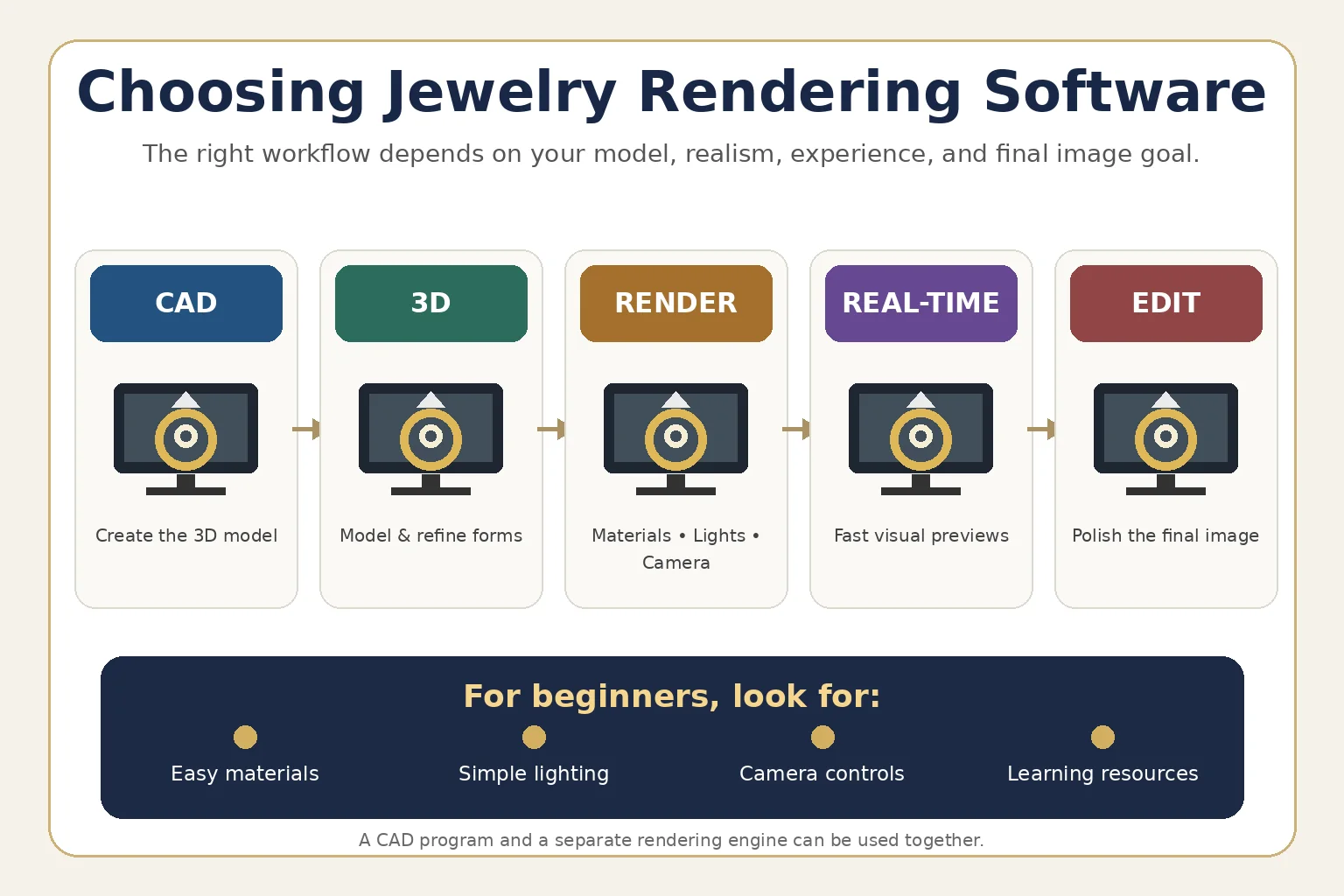
However, there is not a universal rendering program that will work well for all jewelry rendering processes. Everything depends on where the 3D model comes from, how realistic the final result should be, experience of the designer, and the final goal of the image.
Jewelry rendering process can include:
- Jewelry CAD specific software
- General purpose 3D modeling programs
- Rendering engines
- Real time visualization programs
- Software used to edit images
Jewelry designers can opt for a CAD program to create their models and a separate rendering engine to generate their final renders.
For beginners, the software with proper materials, lights, cameras, and easy-to-use learning resources is recommended.
Start With a High-Quality 3D Model
The quality of the render starts from the quality of the model.
Rendering program cannot compensate for basic geometry errors. In case of incorrectly proportioned, incomplete, unsmoothed, or improperly scaled pendant, the rendered result would still be inaccurate.
Review the model before rendering.
Check:
- Overall dimensions
- Surface continuity
- Thickness
- Edges
- Connections
- Stone placement
- Engraving
- Pendant bail
- Symmetry
- Small decorative details
For example, when preparing a men’s pendant, the connection between the pendant and its bail should be modeled clearly because lighting and reflections can make even small geometry problems noticeable.
Creating Realistic Silver Materials
One of the difficult materials to render is the silver because when a metal is polished, it reflects its surroundings.
Another erroneous assumption people make about this material is that once the reflective properties are exaggerated, the result will be a realistic silver material.
What normally makes a realistic silver material is the following:
- Base metal characteristics
- Reflectivity
- Roughness
- Surface smoothness
- Environment reflections
- Micro-surface imperfections
A completely perfect mirror-like surface can sometimes look artificial. Slight variations in roughness can make a polished metal surface appear more believable.
For designers creating imagery related to silver jewelry USA, consistent material settings can also help maintain a recognizable appearance across an online collection.
Glowory’s silver jewelry USA provides a useful example of how silver jewelry can be presented across different product categories and styles.
Rendering Hip Hop Jewelry
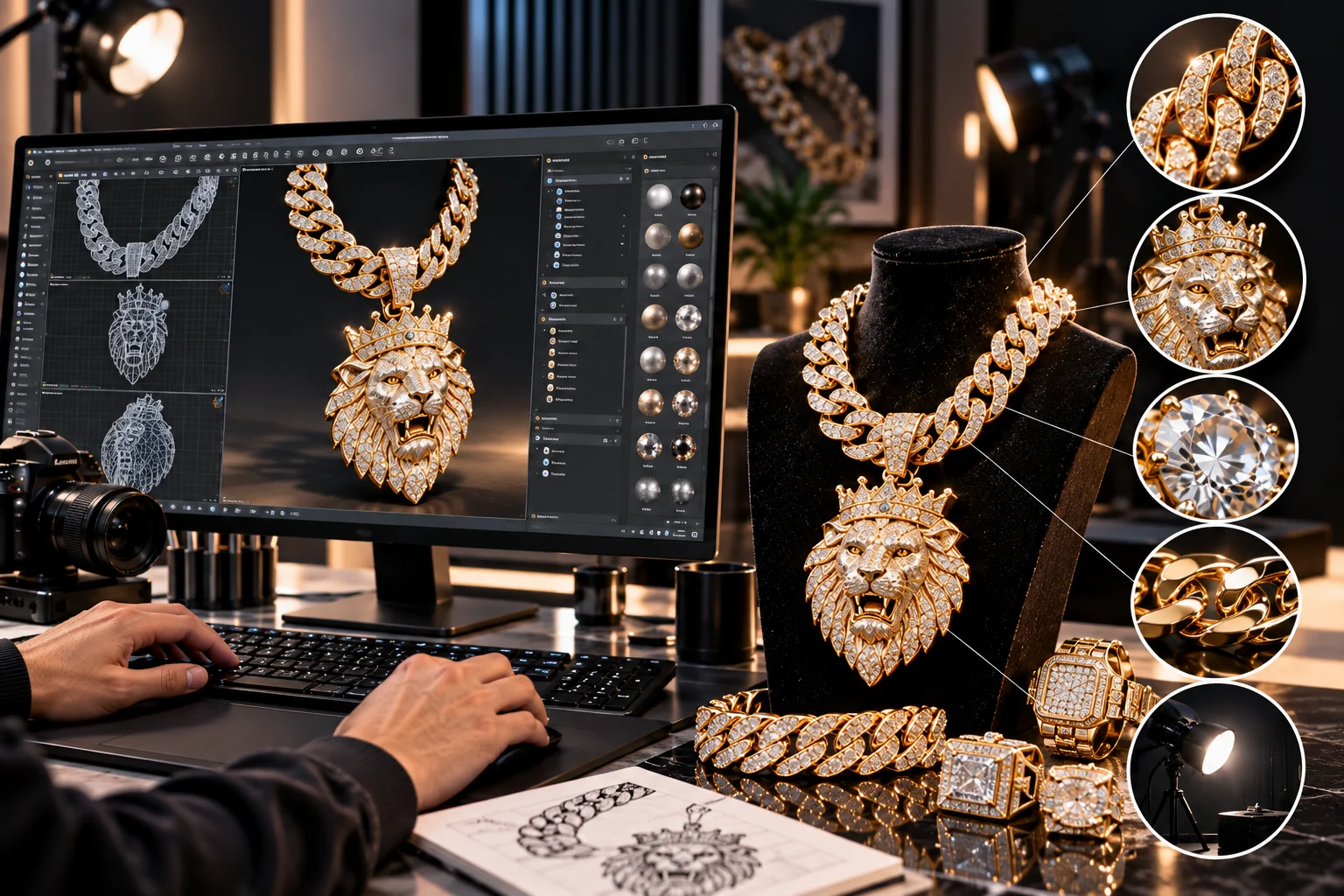
Jewelry that demands boldness usually requires special attention when it comes to lighting, which means using reflections, textures, gemstones, and shapes.
For hip hop jewelry, it is not necessary to create something very flashy. The problem with too much light is that it will obscure certain details and make them hard to recognize.
What needs to be done is:
- Highlight intensity
- Shadow depth
- Metal reflections
- Gemstone sparkle
- Background contrast
- Camera position
A strong render should allow viewers to understand the design while still communicating its statement-oriented character.
Glowory’s hip hop jewelry USA provides examples of bold jewelry styles where reflective surfaces and detailed designs are important visual elements.
Lighting: One of the Most Important Factors
Lighting plays a very significant role in how jewelry will look.
A good place to start is in a studio environment. Light sources that are larger can provide wider reflections on the polished metal, while smaller light sources can give a narrow reflection.
Various lighting arrangements can convey various qualities.
Soft Lighting
Soft lighting may help create soft reflections and a clean commercial look. Soft lighting is particularly useful in creating product pictures on the Internet when the intention is to showcase the jewelry.
Hard Lighting
Bright light sources will enable you to achieve greater highlights and sharper shadows. It is useful for campaign photos but you need to position the source carefully.
Rim Lighting
Putting a rim light behind or adjacent to the piece of jewelry can be a great way to define the borders of the jewelry.
The ideal type of lighting will depend on the material and the design of the piece. Silver, gold, gemstones, and matte surfaces all react differently to the same lighting conditions.
Choosing the Right Camera Angle
The placement of the camera must convey the jewelry effectively.
In the case of product photography, a plain perspective may help the viewers to visualize the exact form of the object. A slight angle can make it possible to see depth and texture.
Perspective should not be overdone since this can make a design unrealistic. A pendant that is drastically altered in proportions would generate expectations that are not realistic.
Different perspectives may also work well because:
- Front view
- Three-quarter view
- Side view
- Close-up detail
- Back view where relevant
For e-commerce, consistency between products is especially important. Using similar camera distances and angles can make a collection appear more organized.
Showing Gemstones and Reflective Details
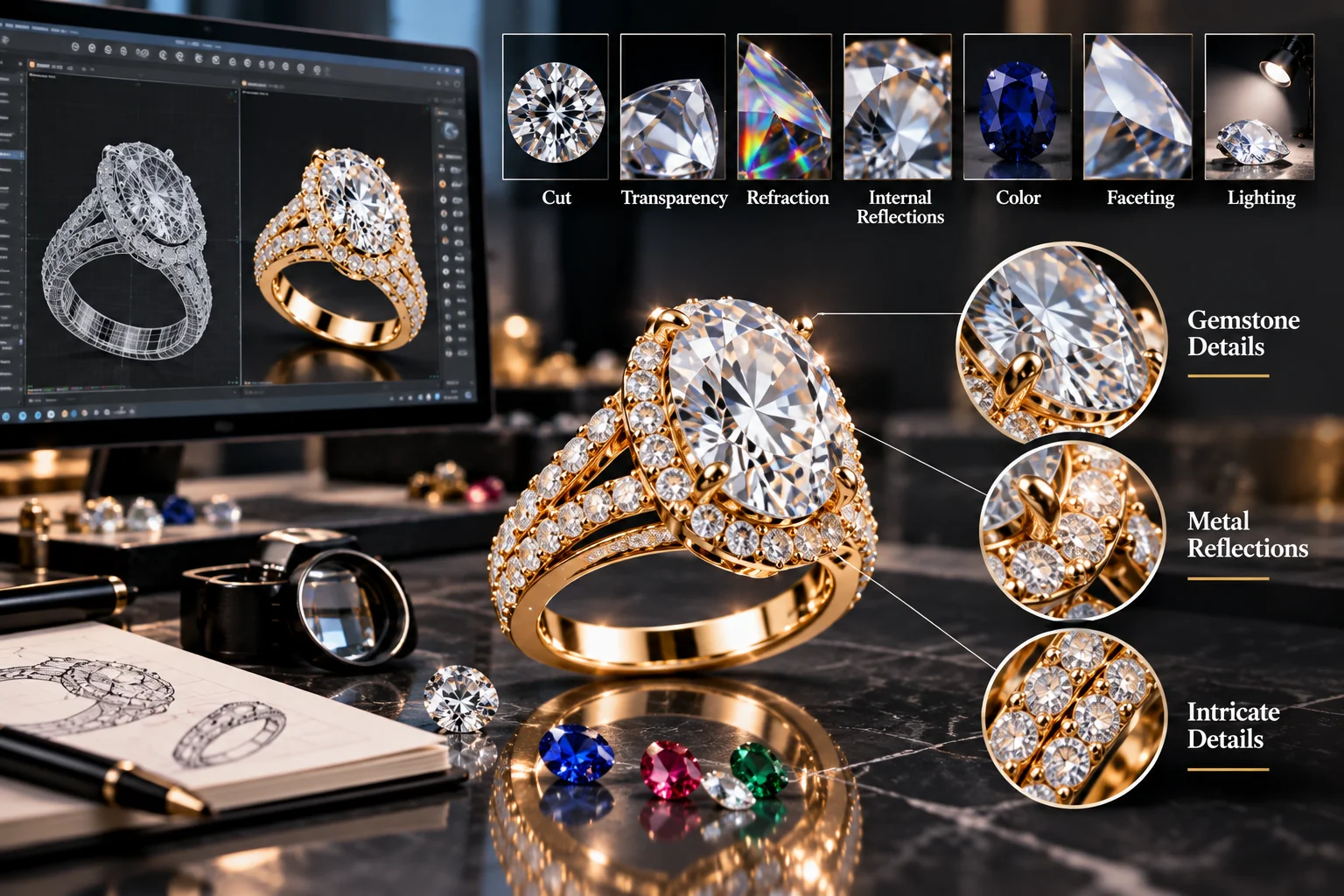
Gemstones require their own rendering considerations.
A realistic gemstone render depends on factors such as:
- Cut
- Transparency
- Refraction
- Internal reflections
- Color
- Faceting
- Lighting
The metal that surrounds it will also play a role in determining its appearance.
When dealing with highly intricate statement pieces, the designers should not over expose the image, as doing so will make all the highlights pure white and thus miss out on crucial information regarding the stone and the metal.
The right lighting will make the jewelry visible and its reflective elements apparent.
Background and Composition
An accurate jewelry render does not always require a complex background.
When it comes to product photography-like images, a neutral background will help focus on the jewelry. It may be white, light gray, black, or gradient background, chosen based on brand’s style. For lifestyle-oriented images, the jewelry can be put into a more contextual background.
It is selected based on the purpose of the image:
E-commerce – clear and simple.
Advertising – visually striking and branded.
Design visualization – clear and informative.
Social Media – visually attractive and platform-specific.
Post-Processing With Image-Editing Software
Rendering is often followed by image editing.
A final image may need adjustments to:
- Exposure
- Contrast
- Cropping
- Background
- Sharpness
- Dust or artifact removal
- Color balance
- Composition
Older Photoshop workflows may also be relevant for designers working with legacy systems, although software compatibility and licensing should always be checked against the developer’s current requirements. A resource covering Photoshop CS6 for Windows provides historical information about that version.
Post-processing should enhance the render rather than hide fundamental problems in the 3D model.
Common Jewelry Rendering Mistakes
Beginners often encounter several recurring problems.
Reflections Too Much Of
Very reflective surfaces can create large white patches that make it impossible to see the jewelry’s silhouette.
Inaccurate Size
A nice render doesn’t necessarily mean good proportions. Good modeling is critical here.
Inadequate Lighting
Badly placed lighting can make one side of the jewelry invisible while generating distracting highlights on other sides.
Too Fake-Like Gemstones
Improper reflection or too much brightness can make the gemstones look fake.
Overused Post-Processing
An overuse of filters such as sharpness and saturation can make the render look artificial.
Different Views Of The Same Products
When designing an online store, having different perspectives for one product can make it look isolated from others.
A Simple Jewelry Rendering Workflow
A practical workflow can be organized into several stages:
- Prepare the CAD model
Verify the geometry, dimension, and details.
- Cleanup the scene
Eliminate unnecessary items from the scene.
- Apply the materials
Prepare silver, gold, gems, or any other material.
- Add lighting
Select the light sources that fit the material.
- Set the camera
Select the best angle to convey the design.
- Render the test
Render using the low quality render to check errors.
- Improve the materials and lighting
Adjust the reflection, shadows, and materials.
- Render the final image
Render the image using the correct resolution.
- Edit the image
Edit using the image editor.
- Export the image
Export the image for use in the desired platform.
Frequently Asked Questions
What software is used to render jewelry?
It is possible to create a visual representation of the jewelry by using jewelry visualization software, generic 3D software, and physically based rendering systems. Which of the three should be used will depend on several factors.
How do I make silver jewelry look realistic in a render?
Accurate geometry, physically correct metallic behavior, correct reflections, adequate lighting, and an accurate environment must be used. The silver material must not be considered entirely white or a perfect mirror material.
How can I make a jewelry render look like a photograph?
Always start with good 3D modeling, realistic material, proper lighting, camera position, and some processing after rendering. Small surface details and reflections will add to the realness of your work.
Can Photoshop be used to create jewelry renders?
However, Photoshop can be considered more of an image editing program, and not a 3D jewelry rendering program. Still, there are some uses for it like post-rendering and composing.
Final Thoughts
A realistic jewel rendering requires a combination of technical modeling skills and visual communication. It is not enough to simply make a jewel look good. It needs to clearly communicate its proportions, materials, details, and design.
In the case of silver jewelry, it is especially critical to properly control reflections and lighting. In the case of bold hip hop jewelry, one needs to find a balance between an exciting presentation and sufficient clarity for the design.
The most effective approach is to start from good CAD geometry, followed by correct materials, lighting, camera angle, and minimum post-production. If done right, digital rendering could become a valuable part of the process of jewelry design, production, development, and presentation online.
For companies producing jewelry collections, it could facilitate visual communication of the designs and consistent presentation of the collection digitally.